- Log in to your Amazon Associate account.
- Click on Product Linking in the top banner and select Product Links.
- Add the ASIN of the product OR search Amazon for the product in the bar they provide.
- Click the Go button.
- Click the Get Link button on the right side of result.
- Alternatively, you can use the Amazon Associates SiteStripe to generate Amazon Affiliate links directly from the product page.
- Use the generated link on your site or other promotional materials according to Amazon's standards.
1. Log in to your Amazon Associate account.
Doing this ensures that the link text is generated in a way that associates the product you're promoting with your account.
2. Click on Product Linking in the top banner and select Product Links.
This will take you to a page that will prompt you to create your link.
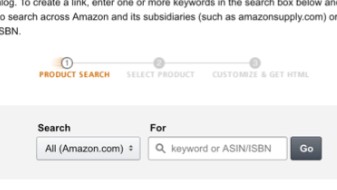
3. Add the ASIN of the product OR search Amazon for the product.
An Amazon Standard Identification Number (ASIN) is a 10-character alphanumeric code assigned to a product by Amazon for identification within their product catalog. You can find the ASIN of a product within the Product Information section of the product's Amazon listing. That means you'll have to grab it within another window.
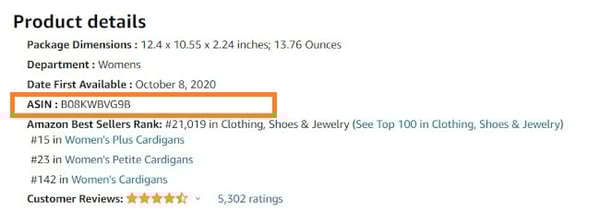
Alternatively, if you can't find the ASIN, Amazon will allow you to search the catalog for the product you're promoting.
4. Click the Go button.
This will generate a result at the bottom. Be sure to verify that this is the intended product you wanted to promote.
5. Click the Get Link button on the right side.
This will copy your new Amazon Affiliate link to your clipboard, and you can now use that link in your promotions.
6. Alternatively, you can use the Amazon Associates SiteStripe to generate Amazon Affiliate links.
A simpler way to generate your Amazon Affiliate Links is by using the SiteStripe bar that shows up on product pages when you're logged in to your Amazon Affiliate Panel.
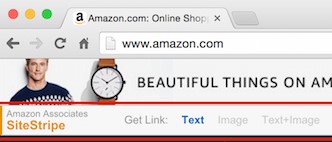
Just click the Text button in the Get Link selector. Then copy the generated link that is provided in the popup.
7. Use the generated link on your site or other promotional materials according to Amazon's standards.
Just remember that Amazon's guidelines prohibit the use of the link in offline promotions, email, and eBooks or PDFs. As with most marketing and sales, quality content is at the heart of success. Ensure you're attracting your audience with quality content and share relevant affiliate links with them on your site or YouTube channel.
Each link you generate will have a cookie that will then follow your website visitors after they click on the link. This is highly beneficial to you, because it increases the likelihood of you receiving commission for the sale. The only problem is that it only lasts for a limited amount of time.
.png)


Comments
Post a Comment